[Design Mishaps]
Divi Law

Let Us Handle Your Case With Confidence
Lightly colored text on a low contrast background
GOOD DESIGN BUILDS TRUST
I want you to trust my firm
Design choices influence how professionalism, reliability, and attention to detail are perceived—often within seconds.

My site has accessibility issues.
Accessibility concerns are often unintentional, but they can create real barriers for users and expose firms to unnecessary risk.

My site is poorly designed?
Design issues are not always obvious. Inconsistent layout, low contrast, or unclear navigation can quietly undermine trust.

Personal Injury
Lorem ipsum dolor sit amet. Donec sed finibus nisi, sed dictum eros. Low Contrast


Medical Malpractice
Quisque aliquet velit sit amet sem interdum faucibus. In feugiat aliquet


Criminal Defense
Luctus lectus non quisque turpis bibendum posuere. ctus non quisque turpis bibendum…. Too light!

Civil Rights
In non pulvinar purus. Curabitur nisi odio, blandit et elit at, suscipit pharetra efficitur elit.
Text constrast and color choices are very important. The wrong contrast makes it difficult for anyone to read.
⚠️ Text contrast and size are frequent accessibility concerns on professional service websites.
Insufficient contrast can limit readability for users with low vision and may affect access to important content, particularly on mobile devices. Increasing contrast and using larger, legible text supports clarity, usability, and a more accessible experience overall.
Which one looks right?
This may sound like an exaggeration, but these issues appear on many law firm websites. In practice, design mistakes like these can put a site at risk of violating ADA accessibility standards. For example, buttons that use text colors that are too light—or that blend into the background—make key actions difficult to read. This creates real barriers for users with low vision, older adults, or anyone with color‑blindness. The bottom font shown is Montserrat Semi‑Bold.

About Us
Remember people with color blindness have a hard time reading low contrast text or text/images.
A ligh Lorem ipsum dolor sit amet, consectetur adipiscing elit. Donec sed finibus nisi, sed dictum eros. Quisque aliquet velit sit amet sem interdum faucibus. Low contrast is hard to read. Etiam tincidunt ligula ut hendrerit semper. Quisque luctus lectus non turpis bibendum posuere. Morbi tortor nibh, fringilla sed pretium sit amet, pharetra non ex. Fusce vel egestas nisl.
Curabitur non bibendum ligula. In non pulvinar purus. Curabitur nisi odio, blandit et elit at, suscipit pharetra elit. Fusce ut mauris quam. Quisque lacinia quam eu commodo mollis. Praesent nisl massa, ultrices vitae ornare sit amet, ultricies eget orci. Sed vitae nulla et justo pellentesque congue nec eu risus. Morbi ac feugiat ante.
The color combination above is very common. Light text with a light background. Problem? It’s hard to read and fails WCAG guidelines


Do you see any of these issues on your website? We are only scratching the surface. Get your site analyzed with our personal framework tool. We call it CEWQI (Pronounced: SUKI).
Use Black text to stay safe
Vivamus id gravida mi, nec ullamcorper purus. Suspendisse ut nibh sagittis lacus viverra aliquam. Praesent ac lobortis mauris, non imperdiet quam. Praesent laoreet elit nisi, id feugiat ante accumsan sed. Vestibulum ante ipsum primis in faucibus orci luctus et ultrices posuere cubilia curae.
Check your background / forground contrast with an online checker
Remember text selection matters–especially on buttons
Luctus lectus non quisque turpis bibendum posuere.
BEFORE
Our Firm Will Fight for You
Lorem ipsum dolor sit amet, consectetur adipiscing elit. Donec sed finibus nisi, sed dictum eros. Quisque aliquet velit sit amet sem interdum faucibus. In feugiat aliquet mollis etiam tincidunt ligula.
AFTER
Our Firm Will Fight for You
Lorem ipsum dolor sit amet, consectetur adipiscing elit. Donec sed finibus nisi, sed dictum eros. Quisque aliquet velit sit amet sem interdum faucibus. In feugiat aliquet mollis etiam tincidunt ligula.
Sample Problems From Actual Websites of Law Firms
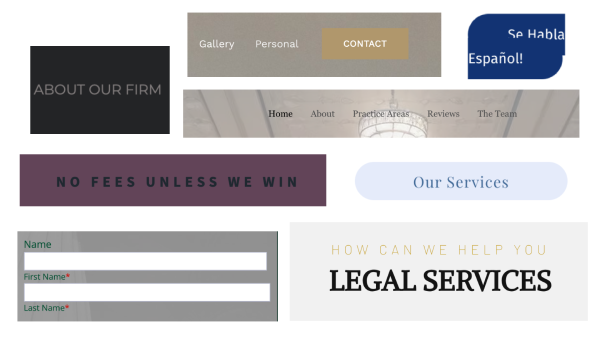
Accessibility and Design Issues on Attorney Websites
The examples shown below are taken from real law firm websites and illustrate common design choices that unintentionally reduce accessibility and usability. While each element may look acceptable in isolation, together they create barriers for users with low vision, color blindness, cognitive disabilities, or those using assistive technologies. Issues such as low color contrast, thin or decorative fonts, inconsistent button styles, unclear hierarchy, and text placed over images make critical information harder to find, read, or interact with. These are common patterns we regularly encounter when reviewing attorney websites.
Common Accessibility & Design Issues Shown Above
References are based on the Web Content Accessibility Guidelines (WCAG), the international standard for digital accessibility.
-
Low-contrast buttons
Button colors blend into the background, making calls-to-action hard to see.
WCAG 2.1 – Contrast requirement (1.4.3), Non-text contrast requirement (1.4.11) -
Navigation text with insufficient contrast
Light or thin text placed over images reduces readability.
WCAG 2.1 – Contrast requirement (1.4.3) -
Inconsistent button styles
Buttons do not follow a consistent visual pattern, making interaction unclear.
WCAG 2.1 – Consistency requirement (3.2.4) -
Decorative or overly thin font choices
Fonts prioritize appearance over clarity, especially on mobile devices.
WCAG 2.1 – Text resize requirement (1.4.4), Visual presentation guidance (1.4.8)
-
Overuse of all-caps text
All-caps text slows reading and reduces comprehension.
WCAG 2.1 – Readability requirement (3.1.5) -
Text placed directly on imagery
Background images interfere with legibility when contrast is not controlled.
WCAG 2.1 – Contrast requirement (1.4.3) -
Form labels with low contrast or placeholder-only text
Users may lose context while completing forms.
WCAG 2.1 – Information relationships requirement (1.3.1), Labels requirement (3.3.2) -
Poor visual hierarchy
Headings, subheadings, and actions compete instead of guiding users clearly.
WCAG 2.1 – Information relationships requirement (1.3.1), Headings requirement (2.4.6)
Client Reviews
Poor all around design
★★★★★
“Ac feugiat ante. Donec ultricies lobortis eros, nec auctor nisl semper ultricies. t erat.”
★★★★★
“Quis blandit erat. Donec laoreet libero non metus volutpat consequat in vel metus. Sed non augue id felis pellentesque. Sed vitae nulla et justo pellentesque congue nec.”
★★★★★
“Luctus lectus non quisque turpis
Office Hours
Daily – 9:30 am to 6:30 pm
Sunday – 08:00 am to 11:30 am
Holidays – 08:00 am to 3:00 pm
Law Firm of
Davivi & Smith
Social Media icons should be the correct color. Text is tiny and hard to read. Office hours wrong color contrast. Should be pure white.
[Poor footer design]
Why do so many companies give up on footer design?